
Argentina Credit Bureau
Argentina eKYC — Credit Bureau
Argentina eKYC non-doc verification leverages Argentina's source of truth to validate individuals. It is essential in eKYC processes for ensuring identity authenticity, regulatory compliance, and enhanced security. It helps prevent fraud, boosts user trust, and streamlines operations through automated and efficient verification methods.
Integration
User input flow
eKYC module configuration gives various options to specify different search criteria with various sources of truth for each country (e.g. US has multiple via Telco, Credit Bureau, and Driver's License). User data can be collected via a user input flow by using pre-selected fields where users can type in their name or date of birth, etc.
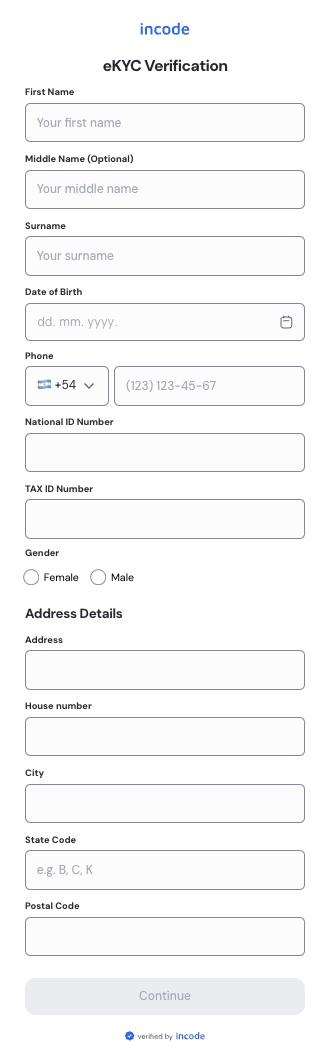
Module configuration
The module configuration can be leveraged to select the applicable fields for the input data you would like to collect from the end user.
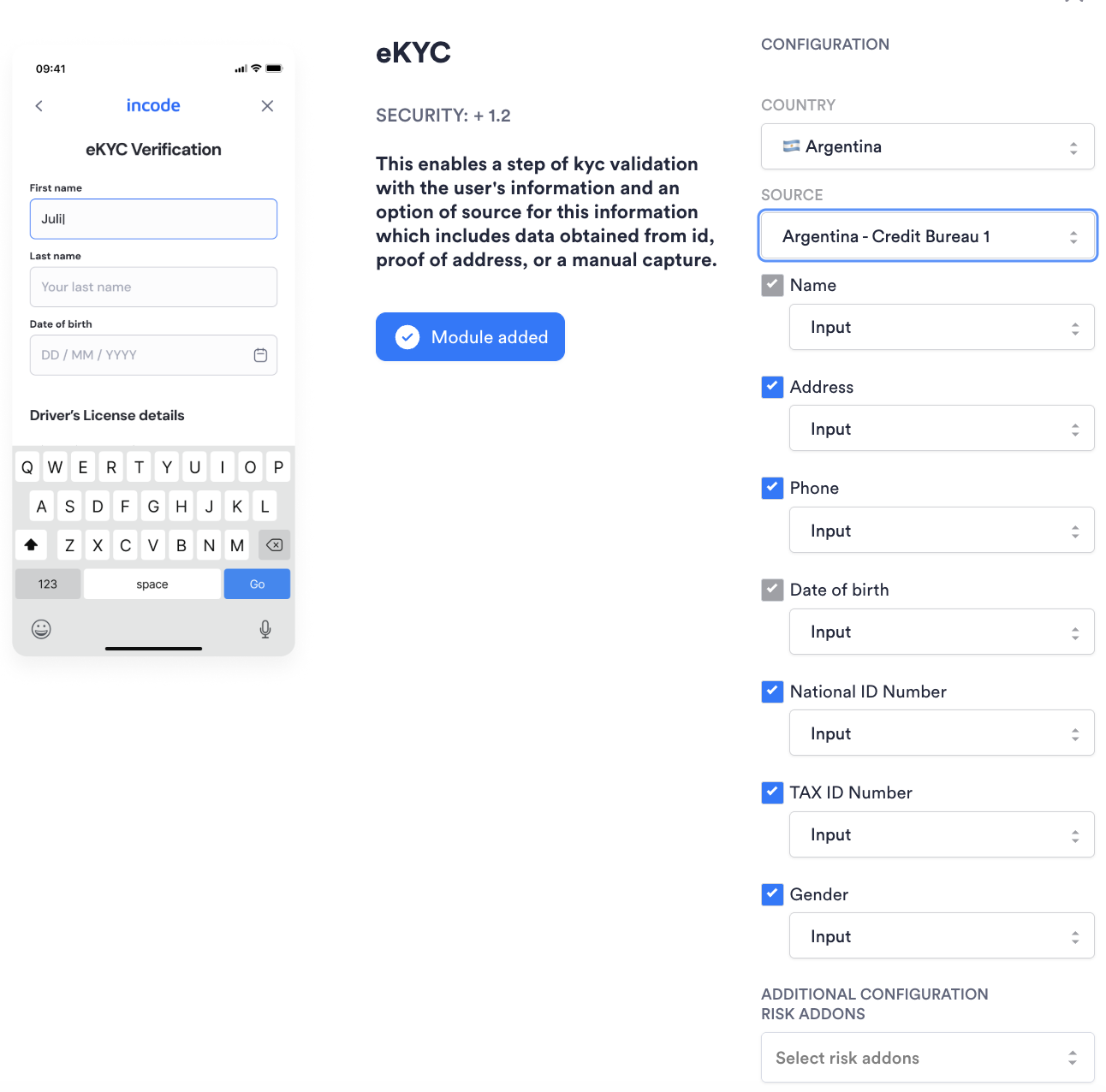
eKYC Module configuration
Direct API Approach
All module configurations and user data can be forwarded directly in the request for performing an eKYC search. This will override existing configuration and data collected about the user.
API AuthenticationAll endpoints require authentication headers to be specified as stated in Incode API Documentation.
POST /omni/externalVerification/ekyc
This endpoint performs an eKYC check for the individual specified. Note: Endpoint can have empty body {} and in that case information will be pulled from module configuration and session details.
- plugins: (mandatory) Must be
["kyc"]. - source: (mandatory) String. Must be
"AR_CREDIT_BUR_1". - firstName: (mandatory) String. First name of the individual. Must not contain digits.
- surName: (mandatory) String. Last name / surname of the individual. Must not contain digits.
- country: (mandatory) String. Two-letter Alpha-2 country code. Must be
AR. - dateOfBirth: (mandatory) String. Date of birth in
yyyy-mm-ddformat (e.g.1991-08-02). - middleName: (optional) String. Middle name of the individual. Must not contain digits.
- street: (optional) String. Street address including house or building number. Note: in Argentina,
streetandhouseNoare concatenated into a single address field. - city: (optional) String. City of the individual's address.
- state: (optional) String. Province or state of the individual's address.
- postalCode: (optional) String. Argentine postal code. The modern CPA format is 8 characters — 1 letter + 4 digits + 3 letters (e.g.
C1425ABC). The legacy 4-digit format (e.g.1425) is also accepted. - gender: (optional) String. Gender of the individual. Accepted values:
m(male) orf(female). - phone: (optional) String. Phone number of the individual (digits only).
- idNumber: (optional) String. Argentine National ID — DNI (Documento Nacional de Identidad). Format: exactly 8 digits, no spaces or special characters (e.g.
32165498). - idNumber1: (optional) String. Argentine Tax or Labor ID — CUIT (Clave Única de Identificación Tributaria) or CUIL (Código Único de Identificación Laboral). Format: exactly 11 digits, no spaces or special characters (e.g.
20321654983).
Argentine ID Numbers
ID Type Description Format Example DNI Documento Nacional de Identidad — National identity document Exactly 8 digits, no spaces or special characters 32165498CUIT Clave Única de Identificación Tributaria — Tax ID Exactly 11 digits, no spaces or special characters 20321654983CUIL Código Único de Identificación Laboral — Labor registration ID Exactly 11 digits, no spaces or special characters 27321654986
Example Incode request:
{
    "plugins": ["kyc"],
    "source": "AR_CREDIT_BUR_1",
    "firstName": "Juan",
    "middleName": "Martín",
    "surName": "Pérez Gómez",
    "country": "AR",
    "dateOfBirth": "1991-08-02",
    "street": "Av. Colón 450",
    "city": "Córdoba",
    "state": "Provincia de Córdoba",
    "postalCode": "X5000ABC",
    "gender": "m",
    "phone": "1145237890",
    "idNumber": "32165498",
    "idNumber1": "20321654983"
}
Direct API Response
API AuthenticationAll endpoints require authentication headers to be specified as stated in Incode API Documentation.
Note: Endpoint can have empty body {} and in that case information will be pulled from module configuration and session details.
Example Incode response:
{
    "kyc": [
        {
            "key": "firstNameMatch",
            "status": "Exact"
        },
        {
            "key": "middleNameMatch",
            "status": "Exact"
        },
        {
            "key": "lastNameMatch",
            "status": "Exact"
        },
        {
            "key": "fullNameMatch",
            "status": "Exact"
        },
        {
            "key": "dobMatch",
            "status": "Exact"
        },
        {
            "key": "streetMatch",
            "status": "Exact"
        },
        {
            "key": "cityMatch",
            "status": "Exact"
        },
        {
            "key": "stateMatch",
            "status": "Exact"
        },
        {
            "key": "postalCodeMatch",
            "status": "Exact"
        },
        {
            "key": "fullAddressMatch",
            "status": "Exact"
        },
        {
            "key": "genderMatch",
            "status": "Exact"
        },
        {
            "key": "phoneMatch",
            "status": "Exact"
        },
        {
            "key": "idNumMatch",
            "status": "Exact"
        },
        {
            "key": "idNum1Match",
            "status": "Exact"
        },
        {
            "key": "overallLevel",
            "status": "Low"
        }
    ]
}
eKYC error responses
Please refer to error response to see conventional HTTP response codes to indicate the success or failure of an API request.
Custom 400 error if any mandatory field (firstName, surName, country, dateOfBirth) is missing or empty:
Mandatory fields must be submitted in order to enable request.| Incode API Key | Status | Definition |
|---|---|---|
| firstNameMatch | exact, fuzzy, nomatch | Matches first name submitted against the first name associated with the individual in the source of truth. |
| middleNameMatch | exact, fuzzy, nomatch, nodata | Matches middle name submitted against the middle name in the source of truth. nodata is returned when no middle name is available in the source of truth. |
| lastNameMatch | exact, fuzzy, nomatch | Matches last name submitted against the last name associated with the individual in the source of truth. |
| fullNameMatch | exact, fuzzy, nomatch | Composite match derived from firstNameMatch, lastNameMatch, and middleNameMatch. See overallLevel section below for composite logic. |
| dobMatch | exact, fuzzy, nomatch, nodata | Matches date of birth submitted against the date of birth associated with the individual in the source of truth. |
| streetMatch | exact, fuzzy, nomatch, nodata | Matches street address submitted against the address in the source of truth. In Argentina, street and houseNo are combined into a single address field. |
| cityMatch | exact, fuzzy, nomatch, nodata | Matches city submitted against the city associated with the individual in the source of truth. |
| stateMatch | exact, fuzzy, nomatch, nodata | Matches state or province submitted against the state associated with the individual in the source of truth. |
| postalCodeMatch | exact, fuzzy, nomatch, nodata | Matches postal code submitted against the postal code associated with the individual in the source of truth. |
| fullAddressMatch | exact, fuzzy, nomatch, nodata | Composite match derived from streetMatch, cityMatch, stateMatch, and postalCodeMatch. |
| genderMatch | exact, fuzzy, nomatch, nodata | Matches gender submitted against the gender associated with the individual in the source of truth. |
| phoneMatch | exact, fuzzy, nomatch, nodata | Matches phone number submitted against the phone number associated with the individual in the source of truth. |
| idNumMatch | exact, fuzzy, nomatch, nodata | Matches DNI (National ID) number submitted against the value in the source of truth. |
| idNum1Match | exact, fuzzy, nomatch, nodata | Matches CUIT or CUIL (Tax / Labor ID) submitted against the value in the source of truth. |
| overallLevel | low, medium, high | Overall risk level derived from fullNameMatch and dobMatch. See below for how low, medium, and high are calculated. |
overallLevel
Overall Risk Level is focused on the risk associated with the submitted full name and date of birth.
| Result | Condition |
|---|---|
low | fullNameMatch = exact AND dobMatch = exact |
high | fullNameMatch = nomatch OR dobMatch = nomatch |
medium | Any other combination |
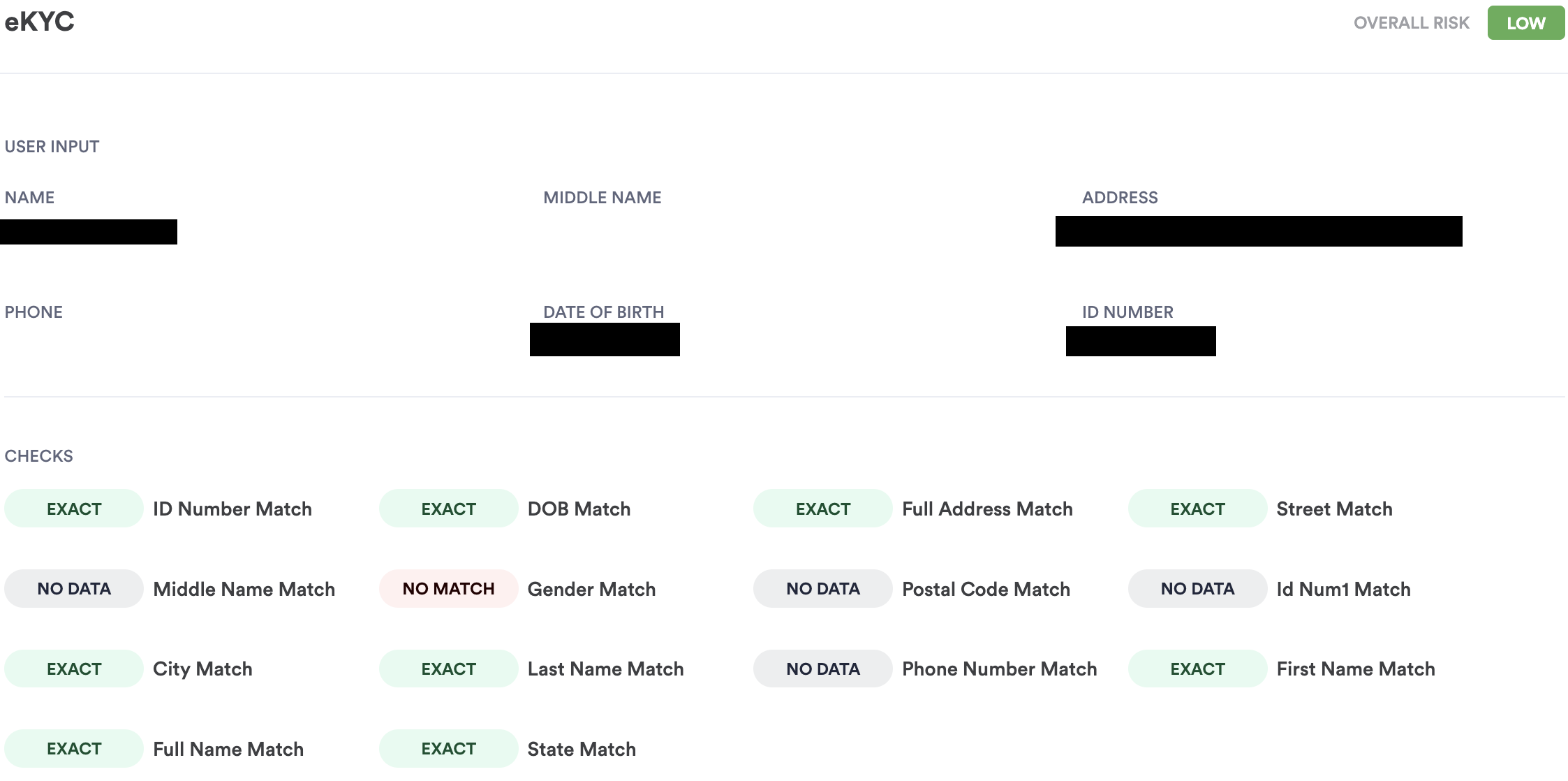
Single Session Dashboard Result
Updated about 13 hours ago